4Warn Weather - WIVB7.1.0
Publisher Description



Never let the weather catch you by surprise again. The trusted weather experts at WIVB News 4 deliver Buffalo, New York's most accurate hour-by-hour forecast for the next day and the week ahead. Unlike other weather apps, you'll get a local forecast that is customized for you.
Download the 4Warn Weather app from WIVB for fast, accurate Western New York and national weather at your fingertips. With personal alert notifications, you'll know when significant weather is heading your way and when to take cover. And when you are traveling, use 4Warn Weather to get real-time weather forecasts, interactive radar and current conditions for anywhere in the U.S.
The 4Warn Weather app utilizes the most advanced radar maps, weather and digital technology available. With its easy-to-use interactive radar, you can take control and see where the storm is now and where it is tracking. Then, set customized alerts to keep you and your family informed and safe.
Features:
- Live interactive radar with many layering options lets you track the storms around you
- The latest video forecast from News 4’s team of meteorologists
- Alerts for severe weather go to your home screen and cue a push alert
- The most accurate hour-by-hour forecast for the next day and week ahead for Buffalo, NY
- Current weather conditions for Buffalo and all of Western New York, plus anywhere in the United States
- Share the weather conditions with your via text message
- You can set multiple custom locations to track forecasts, alerts, radar, and more
- Closings and delays for the Buffalo, New York area
Version History Bug fixes and other enhancements 7.1.0 Jun 19 Here are the new features with this release!
-Dark mode
-Improved lapse speed and bar
-Past (2hrs) and real time as well as future radar (2hrs) combined in one product
-New stylized legends above the map 6.9.0 05/28/2025 Update to the mapping background in the radar tile and page to give it a new modern look. Boundaries, roads, cities display on top of radar data to make it easier to view your location on the map.
New look to the current conditions and forecast tile to make it more modern looking and easier for users to read weather data. Changes include a white background, colored icons, and larger text to make data easier to read.
Updated Current Conditions/Forecast Page. Updates include:
-Page opens to the ‘Overview’ tab which gives current conditions, 3 hour hourly forecast, the 7 day daily forecast, and access to the radar page
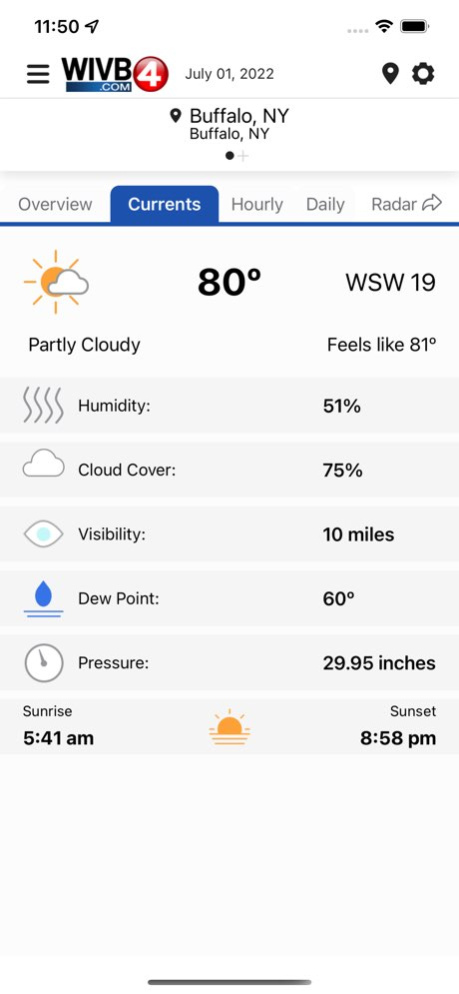
-The 'Currents' tab will give additional information on humidity percent, cloud cover, visibility, dew point, barometric pressure, and sunrise/sunset times.
-The 'Hourly' tab will give detailed weather information for the next 24 hours on the forecasted weather condition, temperature, pop and wind speed and direction.
-The 'Daily' tab will show the 7-day forecast in a manner that is much more similar to on-air 7-day forecasts with a detailed forecast for the next 7 days/nights below. 6.8.2 09/15/2022 Update to the mapping background in the radar tile and page to give it a new modern look. Boundaries, roads, cities display on top of radar data to make it easier to view your location on the map.
New look to the current conditions and forecast tile to make it more modern looking and easier for users to read weather data. Changes include a white background, colored icons, and larger text to make data easier to read.
Updated Current Conditions/Forecast Page. Updates include:
-Page opens to the ‘Overview’ tab which gives current conditions, 3 hour hourly forecast, the 7 day daily forecast, and access to the radar page
-The 'Currents' tab will give additional information on humidity percent, cloud cover, visibility, dew point, barometric pressure, and sunrise/sunset times.
-The 'Hourly' tab will give detailed weather information for the next 24 hours on the forecasted weather condition, temperature, pop and wind speed and direction.
-The 'Daily' tab will show the 7-day forecast in a manner that is much more similar to on-air 7-day forecasts with a detailed forecast for the next 7 days/nights below. 6.8.1 07/11/2022 - Modernized app design, same award-winning forecast!
- All new app layout and weather graphics
- Alerts tailored to you 6.7.1 02/02/2022 - Modernized app design, same award-winning forecast!
- All new app layout and weather graphics
- Alerts tailored to you 6.7.0 01/24/2022 Performance improvements 5.4.940 12/15/2021 Performance improvements 5.4.931 11/24/2021 * Added numerous ADA improvements, including text scaling, voice overs, and improved contrast.
* Implemented non-precise location radius.
* Numerous stability enhancements & bug fixes 5.3.400 04/21/2021 Stability and data enhancements. 5.2.302 03/12/2021 Performance improvements 5.1.605 02/12/2021 * performance improvements 5.1.403 12/08/2020 * performance improvements 5.0.1006 11/12/2020 * performance improvements 5.0.1004 11/06/2020 * performance improvements 5.0.902 09/12/2020 * performance improvements 5.0.801 07/16/2020 Improved weather data source to give you accurate current conditions and forecasts from your favorite weather source! 5.0.400 05/12/2020 * performance improvements 4.10.2704 03/02/2020 * performance improvements 4.10.2700 02/20/2020 * performance improvements 4.10.2400 01/16/2020 * performance improvements 4.10.2200 01/07/2020 * performance improvements 4.10.2100 12/30/2019 * performance improvements 4.10.2000 12/13/2019 * performance improvements 4.10.1601 11/01/2019 * performance improvements 4.10.900 09/13/2019
About 4Warn Weather - WIVB
The company that develops 4Warn Weather - WIVB is LIN Television Corporation. The latest version released by its developer is 7.1.0.
To install 4Warn Weather - WIVB on your iOS device, just click the green Continue To App button above to start the installation process. The app is listed on our website since 2026-10-06 and was downloaded 4 times. We have already checked if the download link is safe, however for your own protection we recommend that you scan the downloaded app with your antivirus. Your antivirus may detect the 4Warn Weather - WIVB as malware if the download link is broken.
How to install 4Warn Weather - WIVB on your iOS device:
- Click on the Continue To App button on our website. This will redirect you to the App Store.
- Once the 4Warn Weather - WIVB is shown in the iTunes listing of your iOS device, you can start its download and installation. Tap on the GET button to the right of the app to start downloading it.
- If you are not logged-in the iOS appstore app, you'll be prompted for your your Apple ID and/or password.
- After 4Warn Weather - WIVB is downloaded, you'll see an INSTALL button to the right. Tap on it to start the actual installation of the iOS app.
- Once installation is finished you can tap on the OPEN button to start it. Its icon will also be added to your device home screen.
Program Details
System requirements
Download information
Pricing
Version History
version 7.1.0
posted on 2026-10-06
Version History Bug fixes and other enhancements 7.1.0 Jun 19 Here are the new features with this release!
-Dark mode
-Improved lapse speed and bar
-Past (2hrs) and real time as well as future radar (2hrs) combined in one product
-New stylized legends above the map 6.9.0 05/28/2025 Update to the mapping background in the radar tile and page to give it a new modern look. Boundaries, roads, cities display on top of radar data to make it easier to view your location on the map.
New look to the current conditions and forecast tile to make it more modern looking and easier for users to read weather data. Changes include a white background, colored icons, and larger text to make data easier to read.
Updated Current Conditions/Forecast Page. Updates include:
-Page opens to the ‘Overview’ tab which gives current conditions, 3 hour hourly forecast, the 7 day daily forecast, and access to the radar page
-The 'Currents' tab will give additional information on humidity percent, cloud cover, visibility, dew point, barometric pressure, and sunrise/sunset times.
-The 'Hourly' tab will give detailed weather information for the next 24 hours on the forecasted weather condition, temperature, pop and wind speed and direction.
-The 'Daily' tab will show the 7-day forecast in a manner that is much more similar to on-air 7-day forecasts with a detailed forecast for the next 7 days/nights below. 6.8.2 09/15/2022 Update to the mapping background in the radar tile and page to give it a new modern look. Boundaries, roads, cities display on top of radar data to make it easier to view your location on the map.
New look to the current conditions and forecast tile to make it more modern looking and easier for users to read weather data. Changes include a white background, colored icons, and larger text to make data easier to read.
Updated Current Conditions/Forecast Page. Updates include:
-Page opens to the ‘Overview’ tab which gives current conditions, 3 hour hourly forecast, the 7 day daily forecast, and access to the radar page
-The 'Currents' tab will give additional information on humidity percent, cloud cover, visibility, dew point, barometric pressure, and sunrise/sunset times.
-The 'Hourly' tab will give detailed weather information for the next 24 hours on the forecasted weather condition, temperature, pop and wind speed and direction.
-The 'Daily' tab will show the 7-day forecast in a manner that is much more similar to on-air 7-day forecasts with a detailed forecast for the next 7 days/nights below. 6.8.1 07/11/2022 - Modernized app design, same award-winning forecast!
- All new app layout and weather graphics
- Alerts tailored to you 6.7.1 02/02/2022 - Modernized app design, same award-winning forecast!
- All new app layout and weather graphics
- Alerts tailored to you 6.7.0 01/24/2022 Performance improvements 5.4.940 12/15/2021 Performance improvements 5.4.931 11/24/2021 * Added numerous ADA improvements, including text scaling, voice overs, and improved contrast.
* Implemented non-precise location radius.
* Numerous stability enhancements & bug fixes 5.3.400 04/21/2021 Stability and data enhancements. 5.2.302 03/12/2021 Performance improvements 5.1.605 02/12/2021 * performance improvements 5.1.403 12/08/2020 * performance improvements 5.0.1006 11/12/2020 * performance improvements 5.0.1004 11/06/2020 * performance improvements 5.0.902 09/12/2020 * performance improvements 5.0.801 07/16/2020 Improved weather data source to give you accurate current conditions and forecasts from your favorite weather source! 5.0.400 05/12/2020 * performance improvements 4.10.2704 03/02/2020 * performance improvements 4.10.2700 02/20/2020 * performance improvements 4.10.2400 01/16/2020 * performance improvements 4.10.2200 01/07/2020 * performance improvements 4.10.2100 12/30/2019 * performance improvements 4.10.2000 12/13/2019 * performance improvements 4.10.1601 11/01/2019 * performance improvements 4.10.900 09/13/2019
version 6.9.0
posted on 2026-06-02
Version History Here are the new features with this release!
-Dark mode
-Improved lapse speed and bar
-Past (2hrs) and real time as well as future radar (2hrs) combined in one product
-New stylized legends above the map 6.9.0 05/28/2025 Update to the mapping background in the radar tile and page to give it a new modern look. Boundaries, roads, cities display on top of radar data to make it easier to view your location on the map.
New look to the current conditions and forecast tile to make it more modern looking and easier for users to read weather data. Changes include a white background, colored icons, and larger text to make data easier to read.
Updated Current Conditions/Forecast Page. Updates include:
-Page opens to the ‘Overview’ tab which gives current conditions, 3 hour hourly forecast, the 7 day daily forecast, and access to the radar page
-The 'Currents' tab will give additional information on humidity percent, cloud cover, visibility, dew point, barometric pressure, and sunrise/sunset times.
-The 'Hourly' tab will give detailed weather information for the next 24 hours on the forecasted weather condition, temperature, pop and wind speed and direction.
-The 'Daily' tab will show the 7-day forecast in a manner that is much more similar to on-air 7-day forecasts with a detailed forecast for the next 7 days/nights below. 6.8.2 09/15/2022 Update to the mapping background in the radar tile and page to give it a new modern look. Boundaries, roads, cities display on top of radar data to make it easier to view your location on the map.
New look to the current conditions and forecast tile to make it more modern looking and easier for users to read weather data. Changes include a white background, colored icons, and larger text to make data easier to read.
Updated Current Conditions/Forecast Page. Updates include:
-Page opens to the ‘Overview’ tab which gives current conditions, 3 hour hourly forecast, the 7 day daily forecast, and access to the radar page
-The 'Currents' tab will give additional information on humidity percent, cloud cover, visibility, dew point, barometric pressure, and sunrise/sunset times.
-The 'Hourly' tab will give detailed weather information for the next 24 hours on the forecasted weather condition, temperature, pop and wind speed and direction.
-The 'Daily' tab will show the 7-day forecast in a manner that is much more similar to on-air 7-day forecasts with a detailed forecast for the next 7 days/nights below. 6.8.1 07/11/2022 - Modernized app design, same award-winning forecast!
- All new app layout and weather graphics
- Alerts tailored to you 6.7.1 02/02/2022 - Modernized app design, same award-winning forecast!
- All new app layout and weather graphics
- Alerts tailored to you 6.7.0 01/24/2022 Performance improvements 5.4.940 12/15/2021 Performance improvements 5.4.931 11/24/2021 * Added numerous ADA improvements, including text scaling, voice overs, and improved contrast.
* Implemented non-precise location radius.
* Numerous stability enhancements & bug fixes 5.3.400 04/21/2021 Stability and data enhancements. 5.2.302 03/12/2021 Performance improvements 5.1.605 02/12/2021 * performance improvements 5.1.403 12/08/2020 * performance improvements 5.0.1006 11/12/2020 * performance improvements 5.0.1004 11/06/2020 * performance improvements 5.0.902 09/12/2020 * performance improvements 5.0.801 07/16/2020 Improved weather data source to give you accurate current conditions and forecasts from your favorite weather source! 5.0.400 05/12/2020 * performance improvements 4.10.2704 03/02/2020 * performance improvements 4.10.2700 02/20/2020 * performance improvements 4.10.2400 01/16/2020 * performance improvements 4.10.2200 01/07/2020 * performance improvements 4.10.2100 12/30/2019 * performance improvements 4.10.2000 12/13/2019 * performance improvements 4.10.1601 11/01/2019 * performance improvements 4.10.900 09/13/2019 * performance improvements 4.10.501 07/27/2019
version 6.9.0
posted on 2025-05-28
May 28, 2025
Version 6.9.0
Here are the new features with this release!
-Dark mode
-Improved lapse speed and bar
-Past (2hrs) and real time as well as future radar (2hrs) combined in one product
-New stylized legends above the map
version 6.9.0
posted on 2025-05-28
Here are the new features with this release!
-Dark mode
-Improved lapse speed and bar
-Past (2hrs) and real time as well as future radar (2hrs) combined in one product
-New stylized legends above the map
version 6.8.2
posted on 2022-09-15
Sep 15, 2022
Version 6.8.2
Update to the mapping background in the radar tile and page to give it a new modern look. Boundaries, roads, cities display on top of radar data to make it easier to view your location on the map.
New look to the current conditions and forecast tile to make it more modern looking and easier for users to read weather data. Changes include a white background, colored icons, and larger text to make data easier to read.
Updated Current Conditions/Forecast Page. Updates include:
-Page opens to the ‘Overview’ tab which gives current conditions, 3 hour hourly forecast, the 7 day daily forecast, and access to the radar page
-The 'Currents' tab will give additional information on humidity percent, cloud cover, visibility, dew point, barometric pressure, and sunrise/sunset times.
-The 'Hourly' tab will give detailed weather information for the next 24 hours on the forecasted weather condition, temperature, pop and wind speed and direction.
-The 'Daily' tab will show the 7-day forecast in a manner that is much more similar to on-air 7-day forecasts with a detailed forecast for the next 7 days/nights below.
version 6.8.1
posted on 2022-07-11
Jul 11, 2022 Version 6.8.1
Update to the mapping background in the radar tile and page to give it a new modern look. Boundaries, roads, cities display on top of radar data to make it easier to view your location on the map.
New look to the current conditions and forecast tile to make it more modern looking and easier for users to read weather data. Changes include a white background, colored icons, and larger text to make data easier to read.
Updated Current Conditions/Forecast Page. Updates include:
-Page opens to the ‘Overview’ tab which gives current conditions, 3 hour hourly forecast, the 7 day daily forecast, and access to the radar page
-The 'Currents' tab will give additional information on humidity percent, cloud cover, visibility, dew point, barometric pressure, and sunrise/sunset times.
-The 'Hourly' tab will give detailed weather information for the next 24 hours on the forecasted weather condition, temperature, pop and wind speed and direction.
-The 'Daily' tab will show the 7-day forecast in a manner that is much more similar to on-air 7-day forecasts with a detailed forecast for the next 7 days/nights below.
version 6.7.1
posted on 2022-02-02
Feb 2, 2022
Version 6.7.1
- Modernized app design, same award-winning forecast!
- All new app layout and weather graphics
- Alerts tailored to you
version 6.7.0
posted on 2022-01-24
Jan 24, 2022 Version 6.7.0
- Modernized app design, same award-winning forecast!
- All new app layout and weather graphics
- Alerts tailored to you
version 5.4.940
posted on 2021-12-15
Dec 15, 2021 Version 5.4.940
Performance improvements
version 5.4.931
posted on 2021-11-24
Nov 24, 2021 Version 5.4.931
Performance improvements
